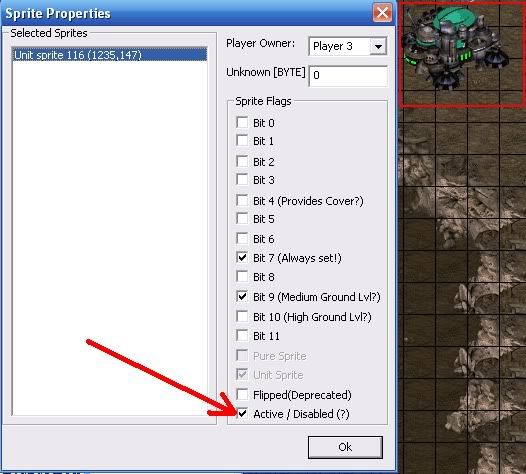
Ok so bottom line is im trying to minimize the amount of locations to use for keeping some terran buildings from lifting. There will be 6 human players and 2 computer players. There will be the upgrades section which consists of 1 Engineering Bay, 1 Barracks, 1 Science Facility for each player. I tried using just 2 locations; 1 for the entire upgrades location to detect if a building was in the air, and the other to move to the lifted building to move it to the same location which would make it unlifted. The issue i came accross was that when the building is being moved, it was moving up one normal grid block. Is there a method anyone can help me with that will allow me to keep the buildings from being lifted, or to land the buildings instantly without them waiting till they are fully lifted. If you need more info just let me know. I would prefer not having a location at each building... roughly 18 locations...
thx
None.

An artist's depiction of an Extended Unit Death


If you have them lined up, you can use the technique used for location grids to center the location to the appropriate area.
For example, if all the buildings are 10 tiles from the top of the map, make a location that is 10*2+1.5 = 21.5 tiles tall (distance from edge times two, plus half the height of the building). When you center the location on the lifted building, the top edge of the map "pushes" the location so that its center is actually at the center of where the building originally was before it lifted.
Alternatively, you can put a location on the tile immediately above the buildings, and the instant they touch that location (i.e., they've started to lift off), move a location on the building. This will work much faster than detecting a full lift of the building, so it may work for you just fine.
ok well the buildings are lined up but they are also overlaping slightly. a player is able to lift 1 building and then land it in the same spot. but if they lift a barracks and an engineering bay, they only have room to land one of them. ive never tried to use a mobile grid before and would like to avoid that if its possible. if not then ill try to learn it. on a side note... is it possible to just disable the lift option?
None.
If you are only using science facilities to ease ups 2-3 and/or to aid unit creation, then you can use a disabled unit sprite, it will be unable to lift; you will not be able to perform emp/irrad/energy upgrades from it.
TheNitesWhoSay - Clan Aura -
githubReached the top of StarCraft theory crafting 2:12 AM CST, August 2nd, 2014.
An artist's depiction of an Extended Unit Death
You can disable lift through some impractical implementations (disabled/incomplete buildings).
Location grids aren't the same as mobile grids, and you wouldn't be implementing a grid, anyway. I was just referring to the technique location grids use to function.
Basically, when you center a location somewhere, SC makes sure its boundaries do not leave the map. So if you centered a 10x10 location in the top left corner (0x0), the center of that location wouldn't be the top left, but rather it would be at 5x5. By creating a really long location, you can basically force its center to be wherever you want it to be (assuming what you're centering it on is on the correct side of the map).
If you'd like, I can make sample maps for these two implementations.
You can disable lift through some impractical implementations (disabled/incomplete buildings).
Location grids aren't the same as mobile grids, and you wouldn't be implementing a grid, anyway. I was just referring to the technique location grids use to function.
Basically, when you center a location somewhere, SC makes sure its boundaries do not leave the map. So if you centered a 10x10 location in the top left corner (0x0), the center of that location wouldn't be the top left, but rather it would be at 5x5. By creating a really long location, you can basically force its center to be wherever you want it to be (assuming what you're centering it on is on the correct side of the map).
If you'd like, I can make sample maps for these two implementations.
Thank you. i would like to be able to see the triggers and the effects if you dont mind.
Edit: just to remember the science facility will have the covert ops attached which will eventually allow ghost range. The barracks will be allowing the building of all units and the engineering bay will be used for upgrades. they will be starting at 0 as well**
None.
If you need to re-stack buildings, there's a cool trick:
1. Create a random unit somewhere
2. Move the random unit to the location you want to stack at
3. Create the unit you want to stack somewhere
4. Remove the random unit
5. Move the created unit to the stack location
^ All in one trigger cycle
TheNitesWhoSay - Clan Aura -
githubReached the top of StarCraft theory crafting 2:12 AM CST, August 2nd, 2014.
An artist's depiction of an Extended Unit Death
I made a quick map and realized the second option I suggested doesn't work fast enough to get the effect you want. Option #1 it is.
As I'm sure you have in your own location, the "Area" location in the attached map only has the air flags selected.
Edit: Based on your current implementation, I'd say you don't need to change any triggers; you just need to change the size of the location you're moving.
Post has been edited 1 time(s), last time on Jun 15 2012, 4:54 am by Roy.
I made a quick map and realized the second option I suggested doesn't work fast enough to get the effect you want. Option #1 it is.
As I'm sure you have in your own location, the "Area" location in the attached map only has the air flags selected.
ok so i checked out the map. *thx for showing me*. for starters, all the terraining is done for the map and the upgrades section is relatively bottom right. so lets say i have all the barracks for each player lined up horizontally like each building in your map. and then a row for facilities and bays. would i need 3 locations, one for each row? because if im grasping this correctly, they would need to be slightly different sizes since they are about 2~3 tiles vertically
None.
ah yes, one more thing, covert ops don't require a science facility; pre-placed covert ops will continue to be owned by the assigned player. The owner can be changed with a semi-complicated trick, but not simply by the "give" trigger.
TheNitesWhoSay - Clan Aura -
githubReached the top of StarCraft theory crafting 2:12 AM CST, August 2nd, 2014.
This is a pic of what it will look like. Sorry i dont know how to add images directly...
Attachments:
None.
An artist's depiction of an Extended Unit Death
so lets say i have all the barracks for each player lined up horizontally like each building in your map. and then a row for facilities and bays. would i need 3 locations, one for each row? because if im grasping this correctly, they would need to be slightly different sizes since they are about 2~3 tiles vertically
Yes, you would need locations with different heights if you have different rows. The size of the location is based on how far away the building is from the edge of the map.
Based on your image, you would need five locations total (1 for each row and 1 for the whole area).
ah yes, one more thing, covert ops don't require a science facility; pre-placed covert ops will continue to be owned by the assigned player. The owner can be changed with a semi-complicated trick, but not simply by the "give" trigger.
Ok so for the science facilities, i would be able to disable them and the covert ops will still work. and the player will still be able to use upgrades from 1-3???
None.
Ok so for the science facilities, i would be able to disable them and the covert ops will still work. and the player will still be able to use upgrades from 1-3???
Yes, that is the gist of it; but to be perfectly clear, disabled like this, not by "disable doodad state"
Collapse Box

TheNitesWhoSay - Clan Aura -
githubReached the top of StarCraft theory crafting 2:12 AM CST, August 2nd, 2014.
I like that Roy, cool trick

None.
Hey Roy, I came accross an issue with that method. Will that only work if the buildings are on the top half of the map? Because I cant get the locations to be long enough to Center where they would need to be.
None.
Yeah seems buggy from bottom. I can get it to work proper for a few lifts, but on the 5th or 6th lift the buildings start moving upwards when theyre placed. I'm assuming this will only work when the buildings are at the top seeing as the center on top cant move any further north. Maybe Roy has a fix.
None.
If the buildings are in a grid, you could plop some burrowed units down on the left or righthand side (depending on where the buildings are in the map) and use the location shift centered on the burrowed units to replace the buildings. You'd need a location for each horizontal position, the burrowed units "encode" the vertical positions, and the "liftoff detection" location.
None.
An artist's depiction of an Extended Unit Death
Oh yeah, come to think of it, you can only push the location upwards from the bottom of the map, which won't help solve your particular problem (because the buildings shifting up
is the problem).
If the buildings are in a grid, you could plop some burrowed units down on the left or righthand side (depending on where the buildings are in the map) and use the location shift centered on the burrowed units to replace the buildings. You'd need a location for each horizontal position, the burrowed units "encode" the vertical positions, and the "liftoff detection" location.
Yeah, this seems like the quickest way to fix the existing implementation. I placed them along the bottom of the buildings, though.
It's also important to note that locations think the bottom edge of the map is one tile above where it actually is, so you have to ignore the bottom tile when calculating the size of your location (you'll know the location is the wrong size because the building won't be in the correct spot when you replace it). I added one more action to move the location onto the burrowed Zerg Drone (below the buildings) to force the location to hit the bottom edge of the map. The attached map gives the desired result. You'll still need one location for each row, but you can reuse the burrowed unit as the anchor point for each column (as shown in the attached map).
Attachments:
Start players with 3 natural upgrades:
you don't need a science facility.
turn off player vision and instead use player 7 or 8 as their vision:
you can hide stuff from the player, like unused upgrade buildings.
You can also pre-place buildings and link them some distance apart. The link goes away if you lift though, so that's why you have to turn off vision or make it impossible to select the building by covering it with CCs.
"Parliamentary inquiry, Mr. Chairman - do we have to call the Gentleman a gentleman if he's not one?"

 Staredit Network > Forums > SC1 UMS Mapmaking Assistance > Topic: [SOLVED] Keeping Buildings Unlifted

 Roy
Roy


 NudeRaider -- Vrael
 Oh_Man -- so i was today years old wen i learned rebel yell starcraft mission is named after a billy idol song. makes me wonder wat other missions are named after songs