Location GridsThe following article entails an in-depth explanation of the largely obscure Location grids. It is both long and long-winded, but if you stay with me you may end up learning a thing or two. It is my hope that at least someone benefits from this knowledge in furthering his or her understanding of Starcraft and the potential it can have despite its many, many limitations.
Put briefly, a location grid is a type of grid system that can place a location anywhere within where it is built. It utilizes certain Starcraft mechanics in offsetting locations of variable length to create a grid with a built-in resolution and dimensions. In order to understand and create a location grid one should be well versed in starcraft mechanics of location centering, trigger order and unit priority. It is also crucial to understand the concept of centering a location in another- when Starcraft attempts to center a location on a unit in a location and no such unit exists instead it places that location in the center. Whenever a location is centered in another it is implied that it is done by centering on a non existent unit; I like to use map revealers because it is impossible for them to exist inside a location.
How it worksIf a location is centered anywhere that would place its borders outside of the map boundaries Starcraft shifts or 'slides' the location back into map boundaries until the location no longer violates the map borders. A location grid merely uses this concept of sliding to get the middle of many location lengths to many specific lengths from the map border.
In the image below, three locations are being centered on a Goliath- one being 5x1 tiles, one 9x1 tiles, another 13x1 tiles- and a Wraith is killed at each. Because the Goliath is too close to the right border, all three locations are being offset a specific distance from the right border of the map. As long as the Goliath is close enough to the border, the locations will
Always center that distance from the edge.
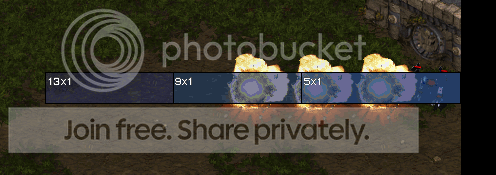
Now suppose the objective was to create a Hydralisk a 6 tile distance from the left border of the map. Because units are created in the center of locations, a location twice the desired distance would be required to place the center where it is needed- in this case, a location 12 tiles wide. In the example shot a burrowed lurker is used to hold the vertical coordinate to center the 12x1 location on.

The basic concept of a location grid is to use sets of these locations to center at desired distances both vertically and horizontally. Two main parameters need to be identified in creating any grid:
1. How much area do I want to cover with my location grid?
2. To what definition, or resolution, do I want to make my location grid?
The answer to both questions will be limited by map resources: Locations, space, and units. In case you aren't aware, a Broodwar map has a limit of 255 locations (including the preset location "Anywhere").
Pure Location Grids Pure location grids use these location sets to center for both X and Y axis offsets. In a pure location grid, the map is divided into 4 equal quadrants and a location placed in each corner.

Lets say our map dimensions are 10x10 tiles and we want a location grid that can place units within a tile definition, or in other words resolution, (in Scmdraft that is equivalent to the normal grid- Hotkey Alt+G; if we wanted a resolution output of 1/2 a tile it would be equivalent to the fine grid- Hotkey Alt+F). Whatever resolution/definition you decide on will determine the length difference between your location grid axis locations. Because it is the center of the location that we want to distance properly, whatever definition we will pick (in this case one tile) will have to be added to either end of each progressively long location to cover the axis. So in the case of the 10x10 dimension map and 1 tile definition, each progressive location will be 2 tiles wider than the last. The image below shows this
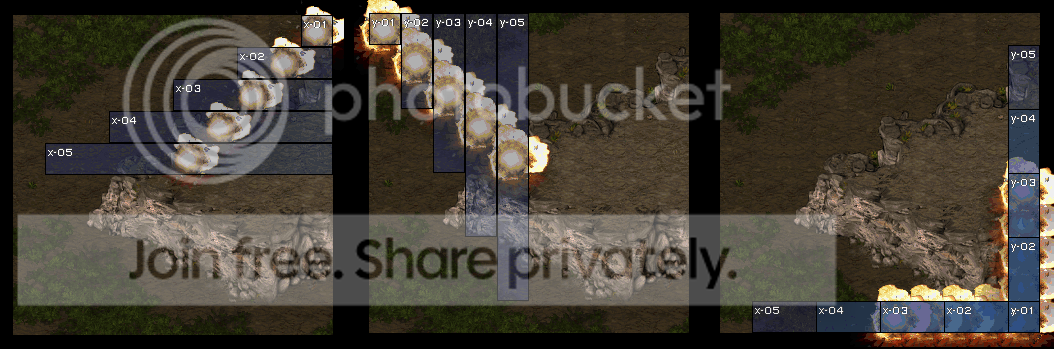
The first map in the image shows the locations needed to cover the x axis, spread out to display the difference in distance between their middles- 1 tile, the definition we desired. The second section in the image shows the same for the Y axis and the last shows the same locations stacked and offset from the bottom right corner- covering the bottom right quadrant. The wraith explosions denote the middle of each location, which as you can see, are all 1 tile distant. These axis locations can only cover half the map, thus the need for quadrants.
Now lets actually apply the pure location grid. Say our objective is to create a Goliath at coordinate 7,5 (the point of origin of my coordinates for the rest of the article will be from the top left with values more right being greater positive X and more down being greater positive Y values). Applied to this situation 7,5 means to the right 7 and 5 tiles down from the top. In order to know which quadrant to use we need to see the actual numbers:
Diagram

In this example, the top right quadrant covers X values 1-5 and Y values 1-5. The top right quadrant covers X values 6-10 and Y values 1-5. The bottom left quadrant covers X values 1-5 and Y values 6-10; the bottom right quadrant covers X values 6-10 and Y values 6-10; this places the desired coordinates 7,5 in the top right quadrant.
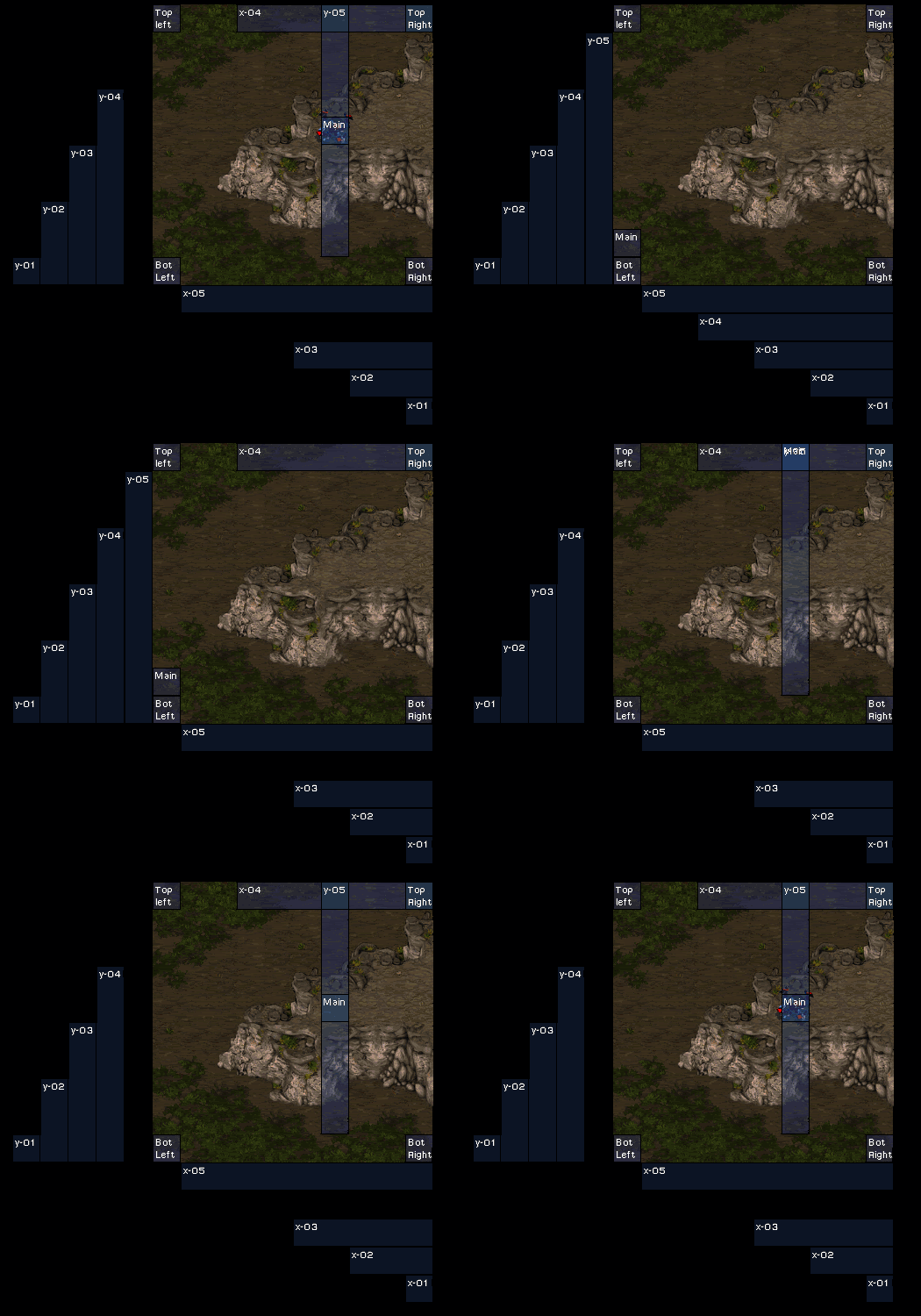
This diagram illustrates the actual process in placing the Goliath at coordinates 7,5.
• Location 'x-04' is centered on location 'Top Right'
• General purpose location 'Main' is centered on location 'x-04'
• Location 'y-05' is centered on location 'Main'
• Location 'Main' is centered on location 'y-05'
• A Terran Goliath is created at location 'Main' for red player
How many locations will your location grid take? I've devised a simple equation to help us with that:
[# of locations needed to cover an axis] = ( [Axis length in tile units] / [Desired definition in tile units] ) / 2
Like I said, it's quite simple. This equation is just for one axis, however, and in a pure location grid both the X and Y axises must have location sets. My example plugged into this equation is:
[# of locations needed to cover X axis] = (10 tiles / 1 tiles) / 2 = 5
[# of locations needed to cover Y axis] = (10 tiles / 1 tiles) / 2 = 5
The location total for the entire grid is given by the equation:
[locations for Y axis] + [locations for X axis] + 4 (four corners) + 1 (general purpose) = [Total]
For the example:
5 + 5 + 4 + 1 = 15
Hybrid Location Grids A Hybrid Location Grid combines the location grid concept and a static grid. Rather than aligning both axises with locations and dividing the map into quadrants, a hybrid grid exchanges one axis of locations and instead aligns that axis with an assortment of units on either side of the map, waiting to be centered on. This method saves an entire axis of locations, allowing for a potentially higher resolution grid; however, for every location saved it requires four units, which, for large maps and high resolutions, can add up unacceptably fast.
For example, in a 256x256 dimension map, it would require all the locations in the map to do a 1 tile definition pure location grid. With a hybrid location grid, you could save half of those locations but use up 512 units; with the extra locations you could double the resolution of the grid to a half tile definition (which would take up 1024 units).
In the hybrid location grid the objective is to create 2 columns (or rows, depending on which axis of locations you're replacing) of unique units on either side of the map. For example purposes I am going to be replacing the Y axis of locations with two columns of burrowed units owned by various neutral players.

The map is now divided into two halves, rather than the four quadrants of the pure location grid. The units allow centering the X locations anywhere within the defined Y axis; the left column allowing you to reach the left side of the map and the right column allowing the right side of the map to be reachable.
Now suppose we wanted to explode a wraith at coordinates 3,9 (using the same reference from before (top left corner being the origin)). First we have to decide which half of the map (and thus which column of units) we need to use. Fortunately, this is much easier to decide than the pure location grid to figure out; for our example 10x10 dimension map X value between 1 and 5 uses the left column and any X value between 6 and 10 uses the right column.
First we center the Y column location on the appropriate set of units (left column in this case). The purpose of the Y column is to center on the correct set of unique units. Then we center the appropriate X location on the appropriate Y holding unit. In this case, the appropriate X location is, of course, x-03 (for 3 tiles to the right) and the appropriate Y unit is a player 9 hunter killer (you can't tell from the image since it happens to be burrowed)
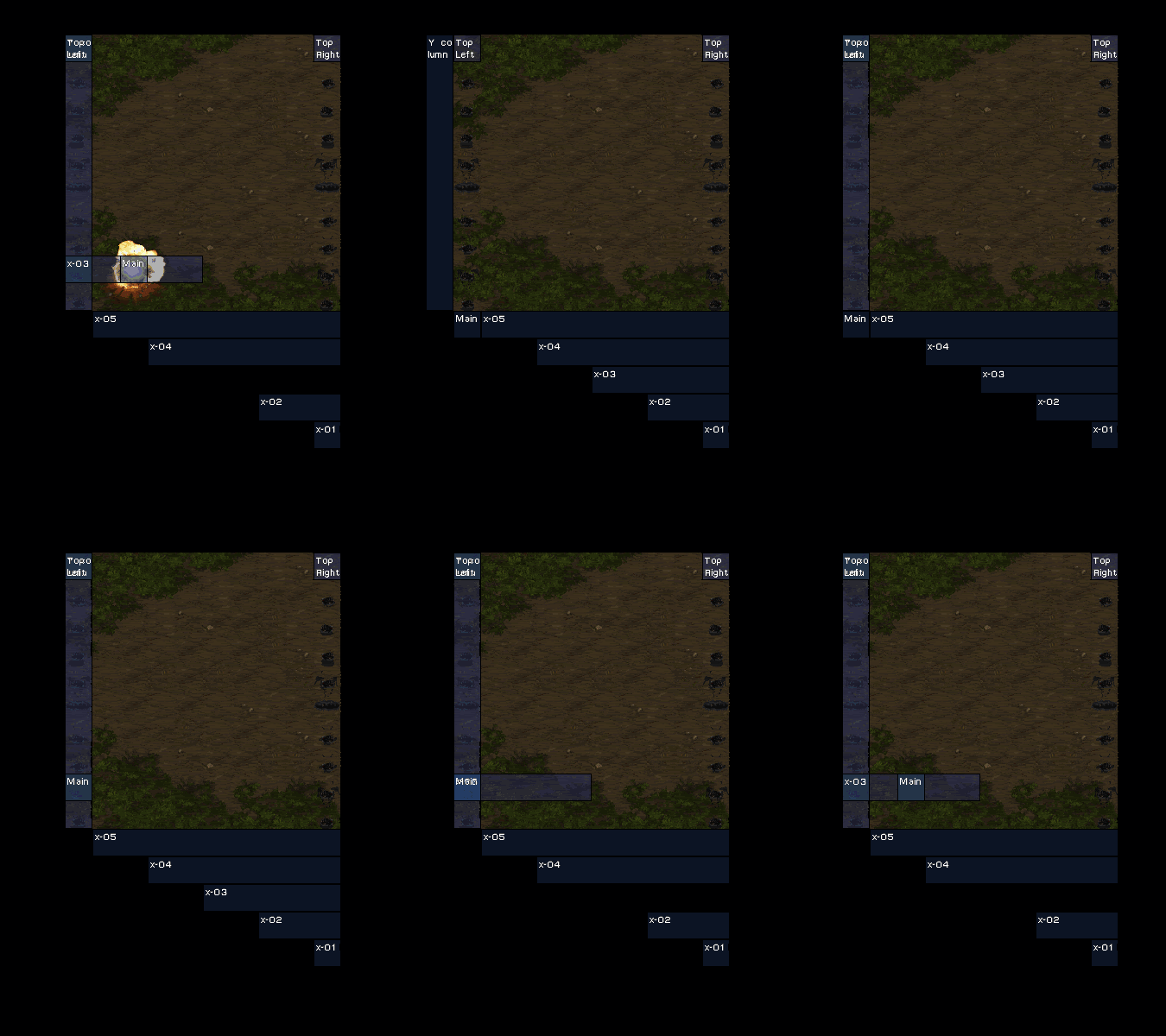
• Location 'Y column' is centered on location 'Top left'
• General purpose location 'Main' is centered on Hunter Killer owned by player 9 at 'Y column'
• Location 'x-03' is centered on location 'Main'
• Location 'Main' is centered on location 'x-03'
• A Terran Wraith is created and killed at location 'Main'
Location shiftingFor the cost of one more location, the unit cost of a Hybrid Location Grid can be effectively halved. This is accomplished using the technique location shifting; this wiki article link is provided
here. To quote:
"Location shifting is a technique used to shift locations directly to either the left or top side of the map from it's current position. It is done by centering a location twice the width of the map (for left shifting) or twice the height of the map (for top shifting) on the location you wish to shift and then centering that location on the shift location.
When a location is centered beyond the bounds of the map Starcraft 'slides' that location back into the map boundaries. Starcraft first checks if the left and top boundaries are exceeded and then the bottom and right boundaries; because a left shifting location is twice the width of the map it first violates the left border (and is slid back into the map) and then violates the right map boundary (and is then slid back into the map from the right side). This sliding places the middle of the left shifting location directly on the left border of the map."
This idea is important because using it we can remove the entire left column in the hybrid location grid (or, if your axis of units is along the top and bottom you can remove the top row). Rather than accessing the left half of the map through the left column, the left shift location is centered on the appropriate Y unit and the appropriate X location then centered on the left shift location. Here is a depiction of this in action:

• Location 'Y column' is centered on location 'Top right'
• Location 'Main' is centered on Hunter Killer owned by player 9 at 'Y column'
• Location 'Left Shift' is centered on location 'Main'
• Location 'x-03' is centered on location 'Main'
• Location 'Main' is centered on location 'x-03'
• A Terran Wraith is created and killed at location 'Main'
Some call it magic, some call it Hybrid Location Shifting Grid.
ApplicationThe uses of a Location grid are vast as it grants the ability to place a location anywhere within the defined parameters. The disadvantage of locations grids is the obvious large location requirement; of course, if you do have a location grid it is unlikely that you'll need too many other locations.
The map Elementa, by Lethal_Illusion, is the perfect example of the power of location grids. It employs a hybrid location grid with a 2 pixel definition (there are 32 pixels in a tile) covering two 20x12 areas (the size of the screen). By sliding locations across the playing field using the location grid, it can scan the coordinates of two defilers, two dark swarms, order the two different computer defilers to mirror the exact replica location of the players across the two screens and create the effects for each of the player's spells dynamically across the screens. Lethal Illusion uses the player and swarm coordinates retrieved from the location grid coordinates and runs a line calculation which generates a coordinate to place each successive frame of any spell in action. A system takes this coordinate and places a location with the location grid to wherever the input coordinate describes.
In closingLocation grids were first implemented by (U)Bolt_Head and further developed by Fishgold in his work on the map Pointer (v1 and v2). The idea was taken another step forward in the development of Microscan, by Fishgold, which first used the concept of sliding locations across the map to scan the location of a unique unit. Lethal_Illusion further did his part in the modernizing the location grid with the first Hybrid Location Grid. He also made the first pixel definition grid and introduced Location Shifting.
Location grids have come a long way over a very long time. Unfortunately, they don't see the light very often as they are relatively complex. With some luck this article will alleviate some of this.
None.



 Heinermann







 Mini Moose 2707

 Currently Working On:
 RIVE -- Lots of fun little nods to different works of others in the cheats too.
 Oh_Man -- so i was today years old wen i learned rebel yell starcraft mission is named after a billy idol song. makes me wonder wat other missions are named after songs
