

None.
Preserve Colors?



It's been a while sense I have made a map. But I thought that if I set the colors (I'm using scmdraft 2 0.8.0) that the colors would stay the same when you hosted the map. How do I make it so the colors wont change?

I think you need to uncheck the "Random Start locations" in the Forces section. It makes all colors random and no mission Breifing.
None.

Quote
...and no mission Breifing.
?!?!?!?
Basically, having it on randomizes the colors of the players, and the slots the players are in for each force.
None.

all of the "randomize start"s have to be cleared, make sure of this with all the forces
None.
I've got it unchecked on all of the forces, but it still isn't working right.
None.


Post the map. If you unchecked randomize players it will work.
None.
i Dunno if this matters, but is it a map where its user selectable?
And are you sure that your wanted player: blue is the actual player set for blue? (Blue being an example)
And are you sure that your wanted player: blue is the actual player set for blue? (Blue being an example)
Are you trying to change player colors? If so, make sure the map is BroodWar, or .scx, not .scm, in .scm you can't change the colors at all.
None.

Staredit Puckwork
Same problem for me... in my string colors, even the title are black instead of red,blue,turquiose,and cyan.
EDIT: Btw Before you tell me to post the map, my computer crashed yesterday so i dont have it anymore. I still want to find out whats wrong. I'm starting to believe it's the new blizzpatch.
EDIT: Btw Before you tell me to post the map, my computer crashed yesterday so i dont have it anymore. I still want to find out whats wrong. I'm starting to believe it's the new blizzpatch.
None.
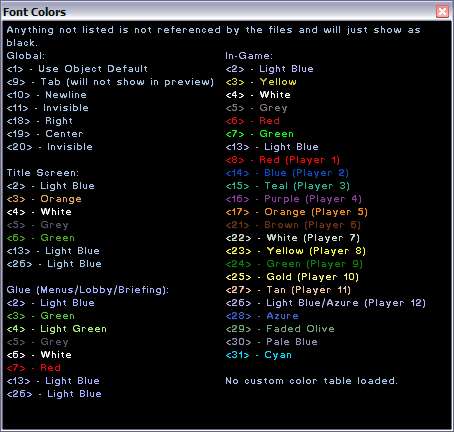
The reason you are getting that problem is because you are using the wrong color codes, different things, like map title, use different codes, SCM displays the basic ones that work in Mission Briefings and in-game, but it displays the wrong ones for everything else, here's a nice table:
None.
Staredit Puckwork
i used the string codes on scmdraft and i checked it over and when i host it, the title goes black
oh and this is totally off topic but does anyone have a copy of missile warfare???
oh and this is totally off topic but does anyone have a copy of missile warfare???
None.

We can't explain the universe, just describe it; and we don't know whether our theories are true, we just know they're not wrong. >Harald Lesch
Quote from  Generalpie
Generalpiei used the string codes on scmdraft and i checked it over and when i host it, the title goes black
oh and this is totally off topic but does anyone have a copy of missile warfare???
oh and this is totally off topic but does anyone have a copy of missile warfare???

Staredit Puckwork
im going to reattempt to make my map again but i have to wait till about 5(Central timing).ill refer to the list when i do.
None.
SCM Draft shows the in-game colors, for all strings, even those which aren't in-game, that's why I posted the table.
None.
Staredit Puckwork
Thanks for the table! its starting to work now! my bound and melee map is gonna be awesome! 
None.

I am also having a trouble with colors..
I wanted to make a Protoss base to be RED and 2 heroes to be TEAL
Another Terran base to be BLUE
I placed them in the editor with those colors but when playing on the game the colors are random
How to solve that?
I wanted to make a Protoss base to be RED and 2 heroes to be TEAL
Another Terran base to be BLUE
I placed them in the editor with those colors but when playing on the game the colors are random
How to solve that?
None.

Quote from Leonardoknd
I am also having a trouble with colors..
I wanted to make a Protoss base to be RED and 2 heroes to be TEAL
Another Terran base to be BLUE
I placed them in the editor with those colors but when playing on the game the colors are random
How to solve that?
I wanted to make a Protoss base to be RED and 2 heroes to be TEAL
Another Terran base to be BLUE
I placed them in the editor with those colors but when playing on the game the colors are random
How to solve that?
Post has been edited 1 time(s), last time on Jul 1 2010, 4:16 pm by NudeRaider. Reason: it's OK to necro when the question is related
None.
Options
Pages: 1
Back to forum
Please log in to reply to this topic or to report it.
Members in this topic: None.
[02:30 am]
 Symmetry -- I dreamed about that as a kid. The idea of a computer capable of analyzing a starcraft map and calculating the fastest possible way to hit the victory condition
[08:47 am]
NimoStar -- the thing with the "*12" thing is completely misleading. The AI isn't using two control groups, it can use each of those actions to command a single unit individually and issue different commands to each single unit.[08:06 am]
NudeRaider -- NudeRaiderNudeRaider shouted: Oh_Man Artosis hasn't caught on how devastating the perfect focus fire is. With the mutas he was like "the Mutas always seem to have less hp than against a human". But he didn't notice that the flock he had selected always just had one muta that was hurt. Same with the wraiths here. He's talking about how valks+wraith is gonna destroy Pluto's valks, then 5s later he's dumbfounded the human player's air is just gone and he never figured out why. And for some reason didn't even think to go back and look at the battle.
*Pluto's wraiths[08:05 am]
NudeRaider -- Oh_ManOh_Man shouted: https://youtu.be/scNIjVxVaYA
Artosis hasn't caught on how devastating the perfect focus fire is. With the mutas he was like "the Mutas always seem to have less hp than against a human". But he didn't notice that the flock he had selected always just had one muta that was hurt. Same with the wraiths here. He's talking about how valks+wraith is gonna destroy Pluto's valks, then 5s later he's dumbfounded the human player's air is just gone and he never figured out why. And for some reason didn't even think to go back and look at the battle.[2026-9-21. : 4:14 pm]
Vrael -- perhaps there is a small professional player trapped in a box in the server rack where pluto is running? hmm?
Members Online: MobMob