Final Call For SCMDraft, Revised, Lets keep this one clean for SI, please.
Post #61 Suicidal Insanity Aug 31 2009, 10:56 pm
|
Lets see...
Falkoner: Maybe this time they will be more interested in interoperatibility... Loki: Besides the crashes that occur when the backup database reach the 2gb limit I fixed one that could occur seldomly for every 10th unique filename in the backup database (So whenever the map was renamed or moved into a new folder). The internal autosave counter did not factor into this. Try using the newest linked version as before with a clean backup DB and tell me if you still have crashes before the 2 GB limit. The maps themselves however should _never_ be corrupted, only the backup DB. If you know of a way to make a map corrupt itself do tell me. Kaias: see release info zany: I disabled the force focus of the map window, I had had a very good reason for that 4 years ago but I dont remember why that was needed. As long as nothing major starts acting up I'll leave it disabled. Kaias: For sprites, what else is needed? (Using the version below) Payne: Screenshot please, and I doubt its anything that staredit / the tileset doesn't have itself. Arol: I cannot reproduce the problems adding sounds to a map, however the transmission briefing action should be fixed in classic trigedit. For text trigedit remember the last argument, i.e.: Transmission("yadda yadda yaddi", 1, Set To, 6000, "staredit\\wav\\make tunnels.wav", 1068); The last argument is wav filelength in milliseconds. Changes: - Classic mission briefing editor/trigger editor now attempt to determine wav length when creating play wav / transmission triggers. - this values MUST be set for text mission briefing editor. - Inverted locations now colored in orange/red (I may change this color later) - Multiselect of sprites now possible in sprite properties - Editing the unknown value in sprites sets the value (Has it been discovered whether this data is used, and for what?) - Can now right click on selected units and create normal/inverted locations using their bounding boxes (Always display locations is recommended for this, also someone please verify the resulting location dimensions) - No more autofocusing of the map window - New bug: when scrolling through doodads, brush isn't immediately visually updated if the size does not change Also if possible try to continue replying to my comments in this post: http://www.staredit.net/173102/ ![]() ![]() ![]() ![]() ![]() ![]() |
Post #62
Kaias
Aug 31 2009, 11:59 pm
Post #65
payne
Sep 1 2009, 3:47 am
|
Addicted to SEN Games -Add more!-
|
For Sprites improvement (and more) return to this post ;o (Look at Brushes section too, they are under-estimated
)And thank you for the Inverted and Fog of War! I hope the Trigger-Tree will works And again, screw compatibility! And when you are talking of "Invert Selections", if that was from me, what I meant was: When you are selecting some terrain pieces for extended terrain purposes, it is some times tedious to select correctly all the right tiles and then... oh no! You've just selected a tile you didn't want! Give us the ability to unselect a tile P.S. Go see your PMs @SI EDIT: That Drag'n'Drop trigger from Kaias is neat! <3 EDIT 2: More improvements you could do: - Default sprites limit set to 499, and bla bla! Anyways, default values of such things should be based off this wiki. - A toggle option that automatically spawn a Start Location under the first unit placed for each player. - In "Options - > Grid", the shortcuts aren't well "right centered" - A copied and pasted burrowed unit should always be able to get stacked, without having to select the "Allow Units Stack" option - I'm not sure if you've said you'd do so, but separating sprites into crash categories would help much (In map/On view/Never/etc.) - Name doodads (I can make up a list for you if you want) And sorry about the doodad bug, it seems like it only happened in a unique case: my map. Isometric blockiness (some may be hard to see, but I swear they are blocky!): This post was edited 1 time, last edit by payne: Sep 1 2009, 4:10 am. ![]() ![]() ![]() ![]() ![]() ![]() |
Post #67
Devourer
Sep 1 2009, 12:13 pm
|
Back in action!
|
There are some Fog-o-War bugs, for example on twilight: when you make sunken (rectangluar) ground and as a wall such a dirt-doodad-tile, in the editor preview you can look through it, ingame you can't. I'm pretty sure there are more bugs of these, screenshot:
![]() This screenshot is taken in the editor, ingame you are not able to look trough it. I mean that you just could copy an action/condition of one trigger and paste it in the same trigger or in an other trigger, would be cool to be able to copy/paste more actions/conditions than 1 Another one: When you are selecting square-terrain-tiles it sometimes creates red lines for me (as far as I know it happens when I select a tile only on the x/y-axis and not both (hope you understood)) . Screenshot: ![]() Edit: I just have checked the new feature of creating locations on selected units and there is one thing I recommend you to do: When you have selected more units than free locations and create locations over them it says for each unit (when you reached the location limit) "Unable to create Location: Location limit reached". I recommend only displaying one pop-up message which says how many units failed to get a location, it's much better. (bad explained? Here if you didn't get it) Like you got 100 locations left and selected 200 units and you want to create a location over each, 100 pop-up boxes will be displayed which says "Unable to create Location: Location limit reached". I recommend only displaying one pop-up message which says how many units failed to get a location, it's much better. Another thing for the create location over unit feature: when you do so for a defiler mound it creates a 3x1 location, I doubt that it is the true size (take a look at the screenshot) This post was edited 6 times, last edit by DeVouReR: Sep 1 2009, 1:25 pm. ![]() ![]() ![]() ![]() ![]() ![]() ![]() |
Post #68 Arol Sep 1 2009, 1:38 pm
|
Umm theres not realy much left to anshwere from anyone
Thanks for fixing the Briefing Bug. Scary that this was the problem, cause ingame transmissions dont need the wav lenght saved in trigedit. However i got a new Issue in the actual ver If your at the Unit layer in older versions u could just press 1-9 to change the Unit u have selected to player 1-9. Now it plays an error Sound if u have a Unit of the Unitlayer selected. For already placed units it still works.€dit Another thing i just came up is that the curso/wasd map scrooling works realy badly now, if this is used to be an improvement, i must say scrolling the map with cursor or wasd is much more important for me then going through the layertree Well, im just not sure if its supossed to be like its now or not. However... Once i use the Layertree, Mapscrolling through coursor or wasd keys dont work anymore until i switch to a different Programm and back to Scmdraft. Normaly this worked throuhg unselecting the current selection from the layertree and just click on the "map"Ugh and the Transmission Text only is displayed as long as the .wav lasts used in the transmisson - a bit unconfortable This post was edited 2 times, last edit by Arol: Sep 1 2009, 3:43 pm. ![]() ![]() ![]() ![]() ![]() ![]() |
Post #69
Heinermann
Sep 1 2009, 2:17 pm
Post #71
payne
Sep 1 2009, 3:08 pm
|
Addicted to SEN Games -Add more!-
|
Supported!
Doodads related: - It is really annoying to have to move your mouse really quickly to the left bar so that the doodad stay in sight (which allows for better doodad searching). You should always make the "display cursor" in the middle of the screen. - When the "doodad cursor" is on the left edge, I think sprites are being removed from the display and it only shows you the terrain part (or at least, it does it for trees). - Again, name these damn doodads xD ![]() ![]() ![]() ![]() ![]() ![]() |
Post #72
Kaias
Sep 1 2009, 3:19 pm
|
It now seems to move locations with parameters outside the map back inside. This is -not- good.
Read up: Location Shifting and why location shifting is so important: Location Grids Edit: Invert X, Y, XY aren't physically changing the coordinates, only shading the location orange/red I'm getting massive errors when I try to make locations outside of bounds on certain maps bleh Edit: and I agree. It is important to denote a change in version even for the micro changes, IE 0.8.0f This post was edited 2 times, last edit by Kaias: Sep 1 2009, 4:07 pm. ![]() ![]() ![]() ![]() ![]() ![]() |
Post #73 Suicidal Insanity Sep 1 2009, 9:12 pm
|
I disabled the code to check for locations outside the map, this was being called when loading a location due to the changes for inverted locations.
However the inverted locations still are stored correctly, its just that the location properties window auto sorts it internally, that I need to also disable. The sprite flags work fine for me, dont know why they shouldn't be. The inverted locations use the units collision box size because I assumed that is what is used for the location test. If buildings act differently let me know. Also fixed the doodad drawing problem on the map edges. Payne: you can move the mouse to the center and scroll through the doodad tree with the latest version, only problem is that killed arrow key scrolling. I would handle this by when you drag a selection box holding, say ctrl+shift, it inverts the selection of the units in the box. <- ctrl shift is already used to add another box of units to the current box This post was edited 3 times, last edit by Suicidal Insanity: Sep 1 2009, 9:50 pm. ![]() ![]() ![]() ![]() ![]() ![]() |
Post #74
Jack[RCDF
Sep 1 2009, 9:53 pm
|
Skin to bone, steel to rust, ash to ashes, dust to dust.
|
Ah, I thought you said you DIDN'T change that. If it's too annoying without arrowkey movement then MMB scroll would be better than nothing for going through doodads.
![]() ![]() ![]() ![]() ![]() ![]() Red classic. I have mostly left SEN except for the Temple Siege 2 forum (hidden to most of you). I am available via PM still, and Skype as JackRCDF. If it is important to you, you will find a way. Otherwise, you will find an excuse. -Unknown Magnificent! Perhaps you shouldn't be on SEN as much, too... Better than the iPad! |
Post #75 Suicidal Insanity Sep 1 2009, 10:38 pm
|
New updates:
Unit properties dialog redesign (Note: moving units or changing unit IDs is not attached to the undo list yet.) Disabled the location boundary checking code Fixed doodad sprite display for left border and top border of map Map window now receives focus after left and right clicking, so it should be easier to use wasd/arrow key based scrolling and its still possible to use arrow keys for the tree at the left. ![]() ![]() ![]() ![]() ![]() ![]() |
Post #76
Falkoner
Sep 1 2009, 10:51 pm
|
It's looking great! I love the new Unit Properties, much cleaner looking. Now, could that be applied to Sprites as well? Also, is there a way to reduce the box around sprites when they are selected to the proper size, or must it be that exact size always? If it hugged the graphic it would look much better
Also, I just realized the main problem with the sprites, when you go to their properties, they are not all selected by default, unlike the units. In the New Map dialog, could you change the default triggers to No Triggers by default? People rarely need the Melee triggers in there. Also, could you make Dirt the default for many of the tilesets, instead of Water? |
Post #77
Mini Moose 2707
Sep 1 2009, 11:10 pm
|
Everything was beautiful and nothing hurt.
|
I just wanted to mention that if you do decide to screw compatability, please make sure compatibility remains untouched for people not using the features that would interfere with it.
![]() ![]() ![]() ![]() ![]() ![]() “Any community that gets its laughs by pretending to be idiots will eventually be flooded by actual idiots who mistakenly believe they're in good company.”
-René Descartes http://yourbrainonporn.com/ -- The Demise of Guys and The Great Porn Experiment (footnote e3, nsfw) http://youtu.be/7cKTBy7_S_I Adobe CS2 is free now. http://vimeo.com/59236702 Dear Gun Control Democrats: 6 Ways to Make a Better Argument Who Pays For This Site |
Post #78 Suicidal Insanity Sep 1 2009, 11:17 pm
|
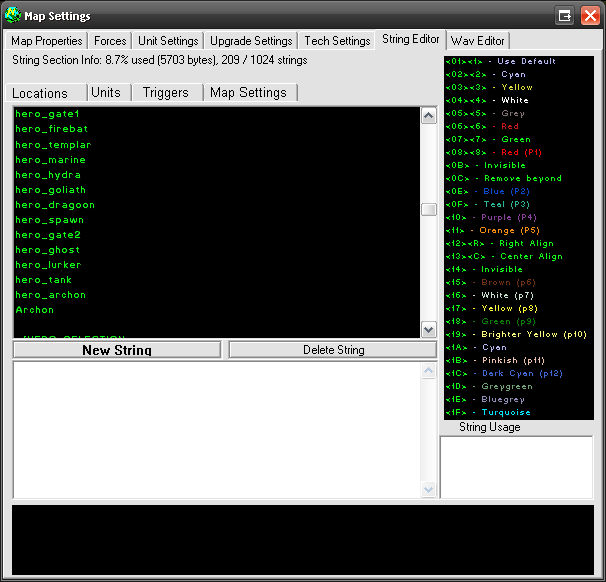
The sprite boxes are so huge because there isn't any info anywhere about the true sprite size, so I have to use some image dimensions that are overkill.
I may look at the sprites window again, for now I plan on waiting for more feedback on what sprites still need before tackling it again, next up is most likely a redesigned string tab in the map settings. I was actually planning on having units not have everything selected by default, not sure whether I will follow through tho if this is useful. (And using some code profiling tools @ work to see if any performance bottlenecks exist... ) ![]() ![]() ![]() ![]() ![]() ![]() |
Post #79
Mini Moose 2707
Sep 1 2009, 11:19 pm
|
Everything was beautiful and nothing hurt.
|
This post was edited 6 times, last edit by Mini Moose 2707: Sep 1 2009, 11:34 pm. ![]() ![]() ![]() ![]() ![]() ![]() |
Post #80 LokiArexon Sep 2 2009, 9:58 am
|
Something I forgot to mention (largely because it's somewhat of a minor detail), is that when you use the quicksave function, you tend to get the "hourglass" if the map is large. However, if you use "save as" then the upper left area of the screen 'bugs out' for a second or two while the map saves. I don't really prefer either one, but I've always found the discrepancy between the two somewhat mystifying.
![]() ![]() ![]() ![]() ![]() ![]() |
0 members in this topic (italic members are currently writing a reply): None
+ guest(s)
+ guest(s)
[05:14 am]
[04:42 am]
[04:42 am]
[04:22 am]
[04:21 am]
[04:18 am]
[04:18 am]


)


If your at the Unit layer in older versions u could just press 1-9 to change the Unit u have selected to player 1-9. Now it plays an error Sound if u have a Unit of the Unitlayer selected. For already placed units it still works.
![[close]](/images/up.gif)