Is there any way to remove this crazy limitation on consoles? ><
I replaced all the transparent color with green, and everything at specific places just turns into black no matter what it is:
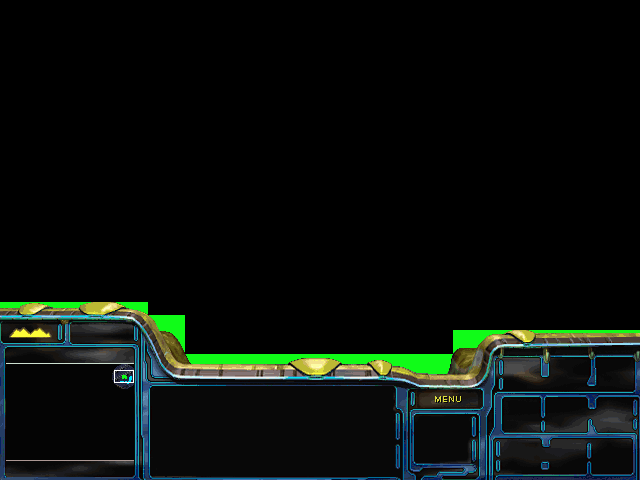
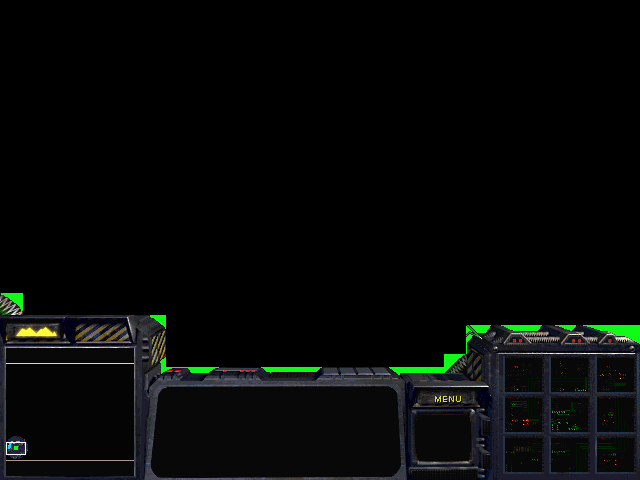
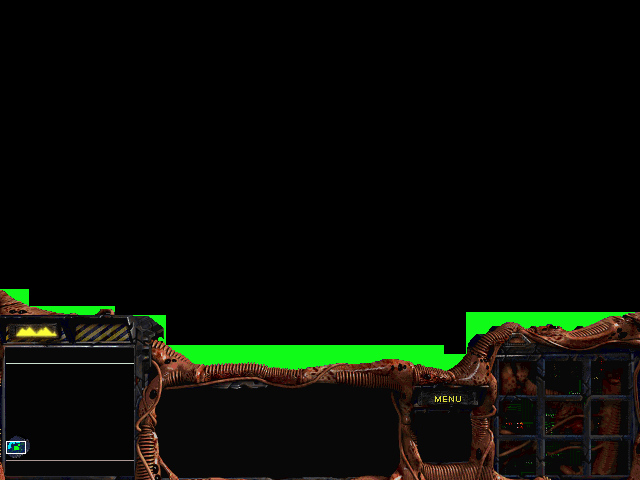
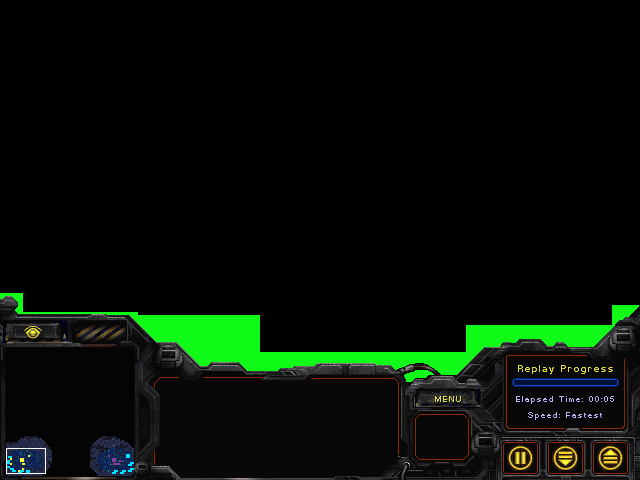
Also wherever it turns to black the cursor does not show.
I guess I could try *.bin image objets...
Image objects work, but overlay console thingy would still be better if it worked properly...
Post has been edited 4 time(s), last time on Jan 18 2008, 10:44 pm by FaRTy1billion.
TinyMap2 - Latest in map compression! ( 7/09/14 - New build! )
EUD Action Enabler - Lightweight EUD/EPD support! (ChaosLauncher/MPQDraft support!)
EUDDB -
topic - Help out by adding your EUDs! Or Submit reference files in the References tab!
MapSketch - New image->map generator!
EUDTrig -
topic - Quickly and easily convert offsets to EUDs! (extended players supported)
SC2 Map Texture Mask Importer/Exporter - Edit texture placement in an image editor!
 This page
 has been viewed [img]http://farty1billion.dyndns.org/Clicky.php?img.gif[/img] times!

ALL PRAISE YOUR SUPREME LORD CORBO


I don't get it. What are you trying to do?
There is no such transparent color, it's just black.
something you might wanna try is taking off the console, you'll see a black ractangle covering a part of the screen

That's the real console the rest that is out of that rectangle is just an overlay given by the .pcx
fuck you all
I don't get it. What are you trying to do?
I did this for the PCXs:

This is what SC shows:
There is no such transparent color, it's just black.
Black
is the transparent color.
something you might wanna try is taking off the console, you'll see a black ractangle covering a part of the screen
That's the real console the rest that is out of that rectangle is just an overlay given by the .pcx
I know all about it... That isn't my problem at all.
TinyMap2 - Latest in map compression! ( 7/09/14 - New build! )
EUD Action Enabler - Lightweight EUD/EPD support! (ChaosLauncher/MPQDraft support!)
EUDDB -
topic - Help out by adding your EUDs! Or Submit reference files in the References tab!
MapSketch - New image->map generator!
EUDTrig -
topic - Quickly and easily convert offsets to EUDs! (extended players supported)
SC2 Map Texture Mask Importer/Exporter - Edit texture placement in an image editor!
This page has been viewed [img]http://farty1billion.dyndns.org/Clicky.php?img.gif[/img] times!
ALL PRAISE YOUR SUPREME LORD CORBO
Oh, rofl... why would you want to do that?
My guess is that it only reads certain parts and ignores the rest of the .pcx so in that case you're screwed
fuck you all
I want to add some graphical things to the to the screen. I guess I'll have to use binedit.
TinyMap2 - Latest in map compression! ( 7/09/14 - New build! )
EUD Action Enabler - Lightweight EUD/EPD support! (ChaosLauncher/MPQDraft support!)
EUDDB -
topic - Help out by adding your EUDs! Or Submit reference files in the References tab!
MapSketch - New image->map generator!
EUDTrig -
topic - Quickly and easily convert offsets to EUDs! (extended players supported)
SC2 Map Texture Mask Importer/Exporter - Edit texture placement in an image editor!
This page has been viewed [img]http://farty1billion.dyndns.org/Clicky.php?img.gif[/img] times!
ive noticed these too, if you have anything sticking out it turns black
None.
I'm going to try using PCXs in some of the bin files, but I don't know if it lets you just put in arbitrary offsets that spill out over the edge of the area... Also it can't be race-specific.
TinyMap2 - Latest in map compression! ( 7/09/14 - New build! )
EUD Action Enabler - Lightweight EUD/EPD support! (ChaosLauncher/MPQDraft support!)
EUDDB -
topic - Help out by adding your EUDs! Or Submit reference files in the References tab!
MapSketch - New image->map generator!
EUDTrig -
topic - Quickly and easily convert offsets to EUDs! (extended players supported)
SC2 Map Texture Mask Importer/Exporter - Edit texture placement in an image editor!
This page has been viewed [img]http://farty1billion.dyndns.org/Clicky.php?img.gif[/img] times!
I think it will only show the console pcx where there is an area from a .bin file. I seem to remember getting the whole console to display properly at the top, image and all, by modifying both the console pcx and the .bin files.
OK, here it is:

It isn't quite what I remembered, but it does indeed show the image anywhere there is an area from a .bin file. Though it seems to be a bit more than just the .bin files that specify where the image will show (unless I forgot one). Note the black space at the bottom.

Also, everything below the console, while visible, it is not click-able. I had to click everything using only the very top portion of the screen.
Post has been edited 4 time(s), last time on Jan 19 2008, 8:05 pm by ShadowFlare.
None.
What about the areas outside of the *.bin files that, when up there, appear black?
The bottom portion (401px and down) I believe to be where StarCraft stops rendering the on-screen information because of the console. If you click and drag a box down, it will stop at the 400px line (I've noticed that even before I knew anything about SC's workings.
)
I was going to use bin files (specifically statlb and statres) to display everything I wanted outside of the console area. However, they have limits on size:
statlb = 200x112
statres = 420x20
Any way of removing/expanding these limits, or adding arbitrary *.bin files to be displayed?
TinyMap2 - Latest in map compression! ( 7/09/14 - New build! )
EUD Action Enabler - Lightweight EUD/EPD support! (ChaosLauncher/MPQDraft support!)
EUDDB -
topic - Help out by adding your EUDs! Or Submit reference files in the References tab!
MapSketch - New image->map generator!
EUDTrig -
topic - Quickly and easily convert offsets to EUDs! (extended players supported)
SC2 Map Texture Mask Importer/Exporter - Edit texture placement in an image editor!
This page has been viewed [img]http://farty1billion.dyndns.org/Clicky.php?img.gif[/img] times!
I used statres.bin to display those little icons in
BWAI (Racine, Raynor Ai etc), but ran into the problems you mention. Those bins seem to have their own limitations as to where things can be displayed in relation to one another. One problem discovered after it was too late was that the placement of my new icons got in the way of additional mind-controlled races or Team Melee games... ooops!. But w/ BinEdit II's ability to add new entries to statres.bin, strange this file didn't work for what you wanted? Guess it still has the size limitations even w/ new entries?

None.
There are tons of hardcoded limitations on bins, apparently. I guess they were unknown until bin editing started getting a bit more use.
TinyMap2 - Latest in map compression! ( 7/09/14 - New build! )
EUD Action Enabler - Lightweight EUD/EPD support! (ChaosLauncher/MPQDraft support!)
EUDDB -
topic - Help out by adding your EUDs! Or Submit reference files in the References tab!
MapSketch - New image->map generator!
EUDTrig -
topic - Quickly and easily convert offsets to EUDs! (extended players supported)
SC2 Map Texture Mask Importer/Exporter - Edit texture placement in an image editor!
This page has been viewed [img]http://farty1billion.dyndns.org/Clicky.php?img.gif[/img] times!